Is an Audio-Only Podcast Still Worth Putting on YouTube? What September Changed
Spotify expanded its video program, Apple said video is coming to paid subscriptions, and a new study puts Netflix ahead of Apple Podcasts. If your podcast is audio only, here are your real options for getting onto video, what each one costs you, and where to start.
If you run an audio-only podcast, the last three weeks probably felt like the industry moving on without you.
- September 17: Spotify expanded its Partner Program to more than 35 new markets, and said video shows in the program have seen more than 45% average growth in consumption hours since it launched.
- September 22: Apple said video is coming to Apple Podcasts Subscriptions in more than 170 countries and regions: subscriber-only video episodes, ad-free video, early access and bonus content. No date yet.
- October 1: Sounds Profitable's Podcast Landscape 2026 study asked US podcast consumers which platforms they'd used for podcasts in the past year.
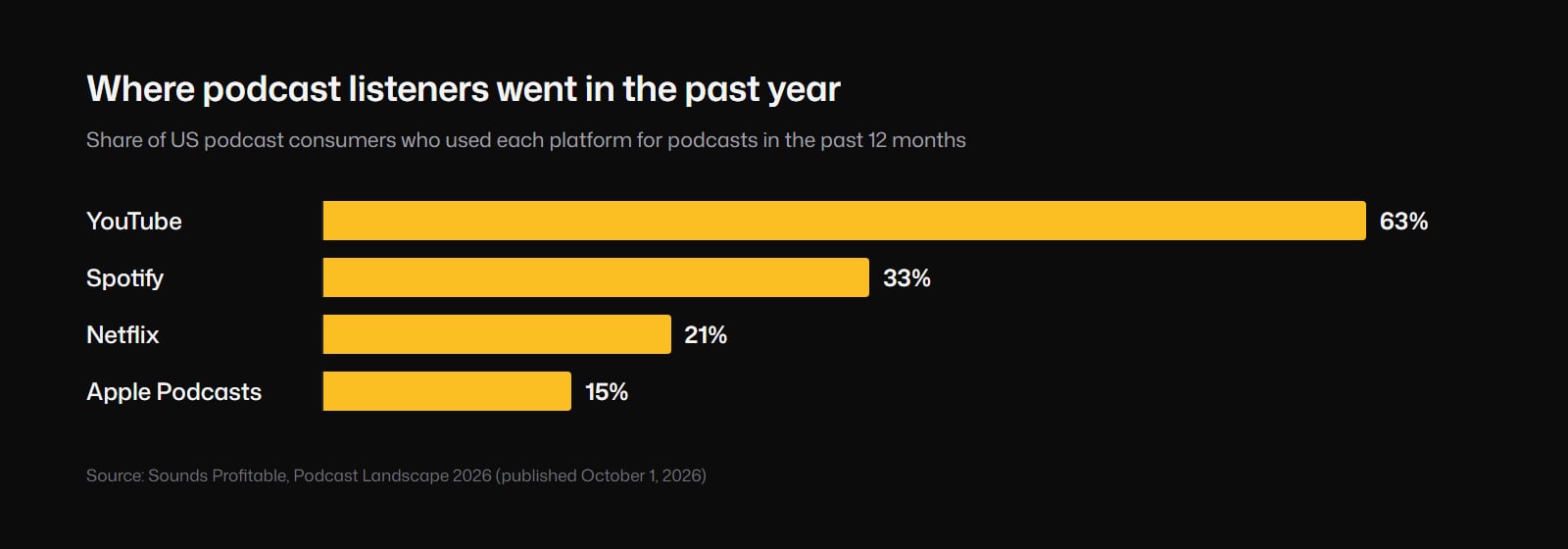
Netflix, a video app in its first year of carrying podcasts, is ahead of Apple Podcasts. That says a lot about where new listeners come from.
What this means, and what it doesn't
It doesn't mean audio is dead. People still listen in the car, at the gym and on walks, and your existing listeners mostly found you in an audio app.
What it does mean is that finding podcasts has moved to video. The apps where people stumble onto a new show are video-first. An audio-only show can still be listened to on those platforms. It's just much harder to discover there.
Your three real options
1. Start filming
The most obvious answer, and the right one for a lot of interview shows. If you and your guests are comfortable on camera, video of the actual conversation is hard to beat.
What it costs you: cameras, lighting, a room that looks decent, remote guests with bad webcams, and a heavier edit every week. And it does nothing for your back catalog. Every episode you've already recorded stays audio forever.
2. Put the audio on a static image
Cover art or a waveform, the full episode, uploaded to YouTube. This is how a lot of shows get onto video platforms, and it's fine for listeners who already know you and want to play your show in the YouTube app.
What it costs you: almost nothing. What it doesn't do: give a stranger scrolling a feed anything to look at. It's a listening experience posted on a video platform.
Podcasters who've tried it are blunt about how it goes. In a thread last month asking whether audio-only shows are worth putting on YouTube at all, one host said they have about 1,500 listeners on their podcast host and "basically zero on YouTube." Another said the average percentage viewed on their audio uploads sits around 12 to 13%. A third summed it up: "if you're not uploading actual video to YouTube, you get what you get."
3. Generate visuals that follow what's being said
AI reads the transcript and generates visuals for the moments in the episode, so when you talk about the night your first business failed, the viewer sees it. No camera, and it works on episodes you recorded years ago.
Watch the wording when you shop for this. "Audio to video" gets sold as two different things. One is an audiogram: your cover art, a waveform and captions, which is option two with nicer packaging. The other actually generates scenes from what's being said. Only the second gives a stranger something to watch.
What it costs you: generation isn't free with any tool, ours included. Covering a full 45-minute episode with generated visuals end to end is a lot of video, and it's priced like it. A one-minute clip is a much smaller job, and short clips are where discovery happens anyway.
Where we'd start: clips first
If your show is audio only today, this is the order we'd go in:
1. Keep publishing the full episode as you do now, plus a static-image version on YouTube so it exists there, even if it won't be what gets you found.
2. Pick three moments from every episode that work on their own. A story with a beginning and an end. A strong opinion. A surprising number. Thirty to ninety seconds each.
3. Turn each one into a vertical video with visuals that follow the words. This is where it pays off to show something on every beat, because there's no camera footage to cut back to.
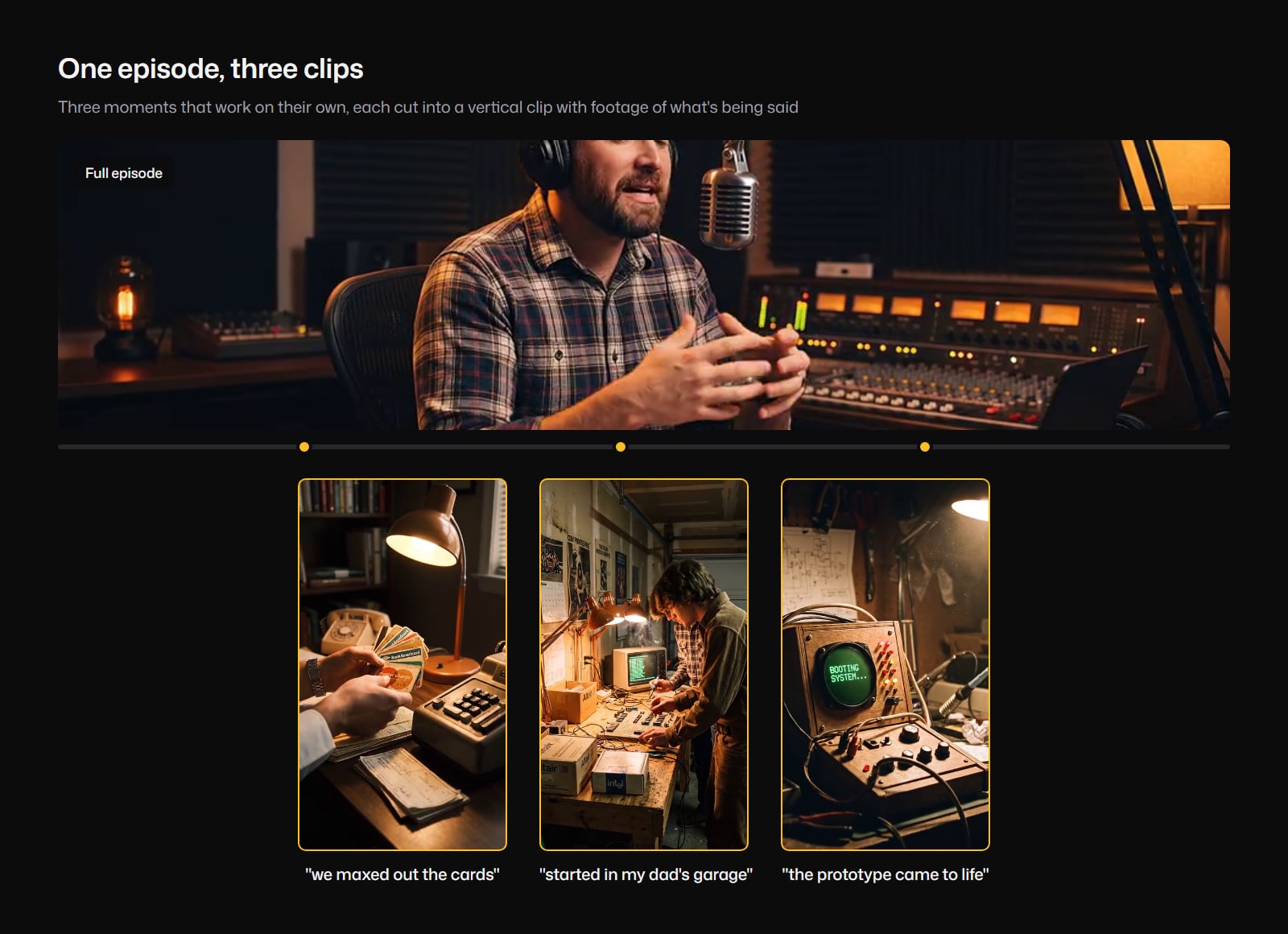
This sample has a host on camera, so each clip cuts between the host and the footage. With an audio-only show there's no host to cut back to, and the footage carries the whole clip.
4. Go back through your catalog. Your best old episodes are full of moments nobody on Shorts or Reels has ever seen. For a show that's been running for years, this is the biggest untapped source of clips you have.
5. Watch what works, then decide about filming. A few weeks of clips tells you which topics and formats pull people in, before you spend money on cameras.
As a bonus, clips from your own show, with visuals built around your own words, are the kind of original content YouTube says it wants more of. That matters since October 1, when YouTube started cutting Shorts reach for channels that re-upload other people's clips.
How to do step three in Compledio
- Upload the clip's audio. MP3, WAV, M4A and the other usual formats all work. You can also upload a whole episode if you'd rather cover the full thing.
- Choose vertical (9:16) for Shorts, Reels and TikTok, or widescreen (16:9) for YouTube.
- Set coverage near the top. Coverage is how much of the runtime gets generated visuals. With no camera footage to fall back on, you want visuals throughout.
- Add a reference image if a person recurs. If the clip tells a story about the host, one photo keeps them looking like the same person in every scene. We tested the difference in this side-by-side.
- Review the moments before anything generates. Each one comes with a description and a preview. Cut what misses, rewrite what's close.
- Render and download the finished video.
The longer walkthrough, including how the transcript turns into scenes, is in how to make a video from just audio.
The short version
- September made it official: people find podcasts on video platforms now, even when they still listen in audio apps.
- Filming works going forward, but doesn't touch your back catalog.
- A static image gets you onto YouTube, but gives new viewers nothing to see.
- Generated visuals work on any episode, old or new. Start with clips: they're a smaller job, and they're where discovery happens.
- Pick three moments per episode, then go back through your best old episodes.
If you've got an episode with a story in it that deserves to be seen, upload a clip of it to Compledio and see what it looks like as a video.