YouTube Shorts Is Cutting Reach for Re-Uploaded Clips. Here's What Counts as Original Now
On October 1, YouTube said Shorts will push original videos and show less from channels that mostly re-upload other people's clips. What changed, what YouTube says doesn't count as making a clip your own, and what to change before your reach drops.
On October 1, YouTube said it is updating Shorts recommendations to "further prioritize original content and reduce the reach of content re-uploaded from other creators without adding anything of your own." The announcement came from Creator Liaison Rene Ritchie on the Creator Insider channel.
If your channel posts clips of other people's videos, this is aimed squarely at you. If you cut Shorts from your own long-form, keep reading anyway, because YouTube left a few gaps that matter to you too.
What actually changed
It's about reach, not money. Channels "identified as primarily aggregating or re-uploading other creators' videos without significant changes will likely see less distribution within the Shorts feed." That's the recommendation system, the thing that decides who sees your Shorts.
Monetization rules didn't change. They were already strict. YouTube's reused content policy has long required borrowed material to be changed significantly to make it your own. This update adds a second penalty on top: even if a channel still earns, it gets shown to fewer people.
There's a way back. Ritchie: "If your channel was previously aggregating or re-uploading and you shift towards original content, the recommendation system will re-evaluate reach."
What YouTube says does not make a clip yours
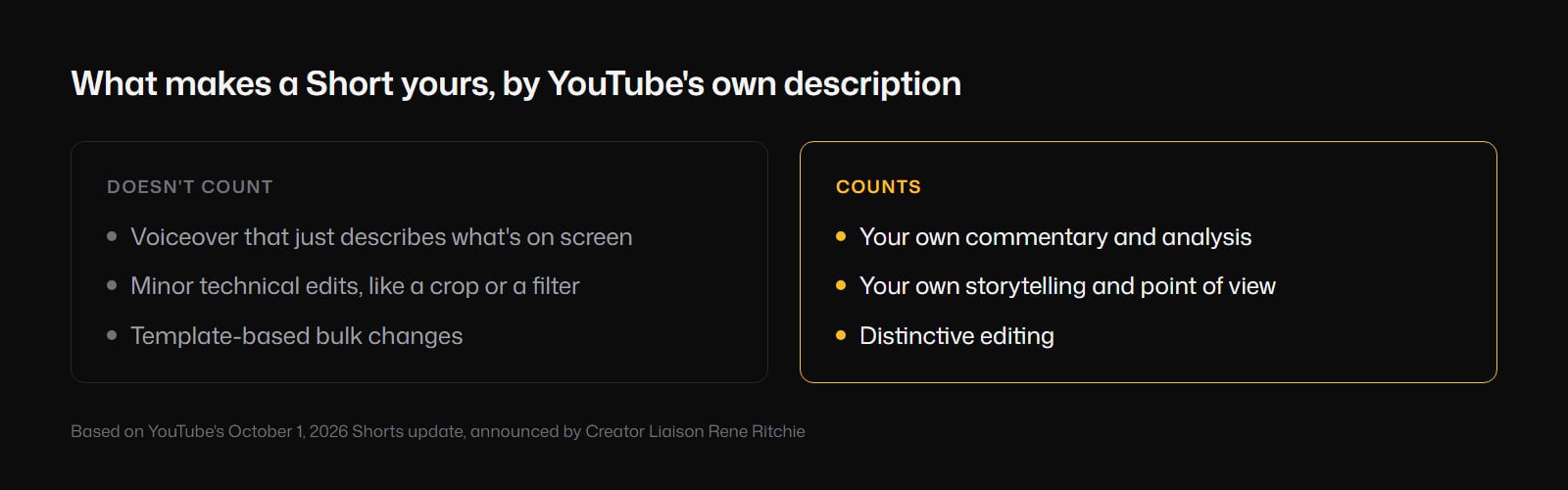
This is the useful part, because it rules out most of the cheap fixes people reach for. According to Ritchie, these don't count:
- Voiceover that just describes what's happening on screen. If the viewer can already see it, saying it out loud adds nothing.
- Minor technical edits. Think cropping to vertical, speeding up, flipping the image, a slow zoom, a color filter.
- Template-based bulk changes. The same caption style, the same music bed and the same progress bar run across fifty clips.
If your current process is "find a viral moment, crop it, put captions on it, post," all three of those describe it.
What does count
YouTube's words are "commentary, analysis, and storytelling," "distinctive editing," and "your own voice, storytelling, or distinct point of view." In other words, something a viewer gets from your Short that they wouldn't get from the original.
What YouTube didn't say
Plenty of questions are still open:
- No start date, and no timeline for when a channel's reach gets re-evaluated.
- No threshold. "Primarily aggregating" could mean half your uploads or nine out of ten. Nobody outside YouTube knows.
- No dashboard. There's nothing in YouTube Studio that tells you your channel has been flagged.
- Nothing about authorized clipping. If a creator pays you per view to clip their podcast, you have permission. YouTube hasn't said whether the system treats that any differently. The safe assumption is that it judges what's on screen, not the agreement behind it.
- Nothing about Shorts cut from your own long-form. That's your own content, so it should be fine on paper, but it hasn't been spelled out.
What creators are reporting so far
A week in, the threads on Reddit are full of people trying to work out whether they were hit. A few patterns are worth knowing before you change anything:
- Your own clips aren't clearly safe. Some creators cutting Shorts from their own streams say they were hit anyway. One reported views down about 80% while click-through rate and view duration both went up. Whether the system can tell your clips apart from someone else's is exactly what YouTube hasn't explained.
- Not every drop is this change. There were plenty of "my Shorts views fell off a cliff" posts in the second half of September, before the announcement. If your drop started before October 1, look elsewhere first.
- AI clipping tools don't make a clip original. A lot of people are asking about this one. A tool that finds the viral moment, crops it and adds captions produces exactly what YouTube described: the original clip, slightly changed, on a template. The tool doesn't change what's on screen.
- Your voice only counts if it says something. One creator who added their own voiceover and edits on top of clips from other channels said the change "absolutely ruined" their reach. Narrating over someone else's footage is still their footage.
- It isn't a shadowban. YouTube announced it publicly and said how to recover. That doesn't make it less painful, but it does mean the fix is in your control.
A simple test before you post
Delete the original footage from your Short in your head. What's left that you made?
If the answer is a caption template and a music track, that's the pattern YouTube described. If what's left is your take, your structure and your explanation, you're on the right side of it.
How to make a clip your own
1. Open with your angle, not their best line. Start with why this moment matters, in your own words, before the clip plays. That's the difference between a re-upload and a reaction with a point of view.
2. Say something the original doesn't. Context, a correction, a counterpoint, what happened next, why it's wrong. Your voice with an opinion, not a narration of what we're watching.
3. Restructure it. A hook, the setup, the moment, your conclusion. Lifting forty seconds out of the middle of a video and posting it isn't editing.
4. Show what you're talking about. When your commentary mentions something the source footage doesn't show, the deal, the place, the number, the thing that happened next, cut to it. Those visuals only exist because of your take, which makes them the kind of editing YouTube is asking for.
5. Don't run everything through one template. If fifty Shorts have the identical caption style, music and pacing, that's the "template-based bulk changes" YouTube called out.
6. Treat even your own clips as edits, not re-uploads. Shorts cut from your own videos and podcast episodes are the cleanest case on paper. Since some creators report being hit anyway, give them the same treatment: a new hook, a tighter cut, visuals for what you're describing.
One honest warning about step four. B-roll on its own doesn't make a re-upload original. Generated visuals pasted over someone else's clip with nothing of yours underneath is exactly the kind of surface change this update is about. Visuals count when they illustrate what you are saying.
If you got a "reused content" rejection instead
That's a different thing. Messages like "Content is not clearly an original creation of this channel" come from the monetization review, under the reused content policy, and people were getting them well before October 1.
If you appeal, don't just say the content is yours. Show it: raw files, your editing timeline, your script. The reviewer needs to see the work that went into it.
Where Compledio fits
Step four is the slow one. Recording your take is quick. Finding or making a visual for every point you make in it is what turns ten minutes of work on a Short into an hour, so most people skip it.
That's the part Compledio handles. Upload your Short with your commentary or voiceover in it (or just the audio), and it transcribes what you said, picks the moments where a visual would help, generates clips that match your words, and assembles the finished vertical video. You review the moments before anything generates. If the same person or place comes up across a series, one reference image keeps them looking the same in every clip, which we covered in the reference image guide.
It won't make a straight re-upload original, and we wouldn't want it to. It makes the "show what you're talking about" step fast enough that you can actually do it on every Short.
The short version
- Since October 1, Shorts shows less from channels that mostly re-upload other creators' clips. Monetization rules are unchanged.
- Narrating what's on screen, small technical edits and bulk templates don't make a clip yours.
- Commentary, analysis, storytelling and distinctive editing do.
- YouTube gave no start date, no threshold and no way to see whether you've been flagged. Some creators report drops on clips of their own streams too.
- Test every Short: take away the original footage, and see what's left that you made.
If you're already adding your own take and want the visuals to keep up with it, try it on your next Short.