B-Roll for the Whole Episode, Not Just the Clips
Most AI B-roll tools are clip tools. They cap out around a minute, which is fine for a Short and useless for the 50-minute episode it came from. Here is what changes when you cover a full episode, and how to control it.
There is an assumption worth clearing up, because we hear it often enough that it costs people money: AI B-roll is for clips.
It is an understandable read. Almost every tool in this category is built around the short-form loop. You drop in an episode, it finds the ten best moments, it hands you ten vertical clips. The B-roll lives inside those clips. The episode itself, the actual thing you spent two hours recording, goes out as two people at microphones for fifty minutes.
That is a product limitation, not a law of physics. You can put B-roll across the whole episode. It is a different job from clipping, and it breaks in different places, so it is worth understanding what actually changes at length.
What changes when the video is fifty minutes instead of fifty seconds
You stop choosing moments by hand. On a thirty second clip you can look at every second and decide. On a fifty minute episode there might be sixty places where a visual would help. Nobody is scrubbing a timeline sixty times. The selection has to be automatic, and it has to be driven by what is actually being said, not by an interval timer dropping a clip every forty-five seconds.
Coverage becomes the control, not clip count. The useful question stops being "how many B-roll clips do I want" and becomes "what percentage of this episode should have something other than my face on it". Those are very different settings. A clip count is arbitrary. A coverage percentage is a decision about pacing.
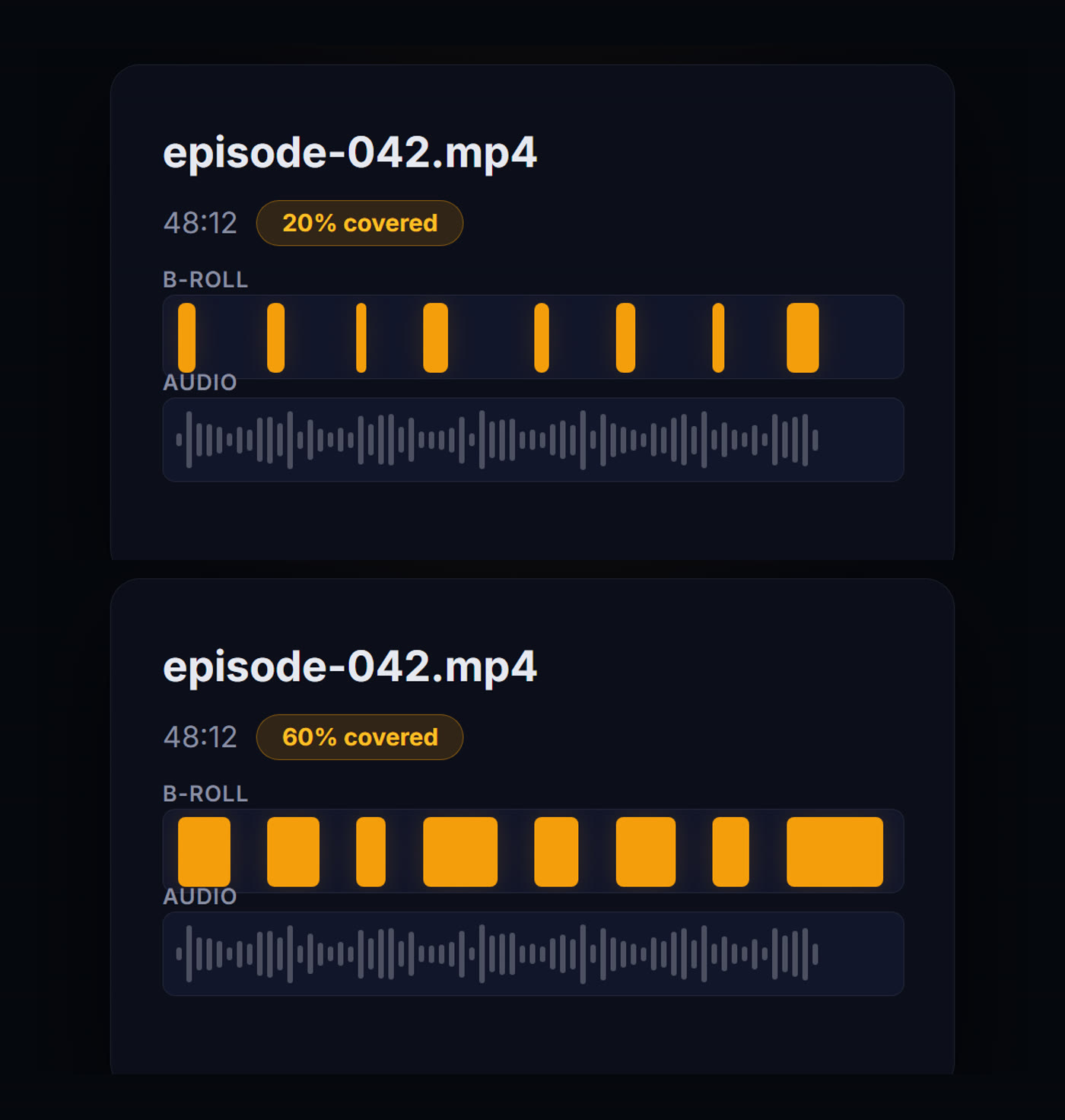
Notice what does not change between those two. The moments are in the same places, because they were chosen from what is being said. Coverage decides how long each one holds, not where they land. Turning it down does not remove the first two thirds of the episode's B-roll, it makes every cutaway shorter.
Consistency stops being free. Three generated clips that do not quite match each other looks like a stylistic choice. Forty clips that do not match each other looks broken. Across a full episode, character drift and style drift are the failure that gets noticed, not the individual clip quality.
Here is that problem solved, using one frame as the reference. The amber-bordered image is the only input. The other five were generated separately, in different environments, lighting conditions, and wardrobes.
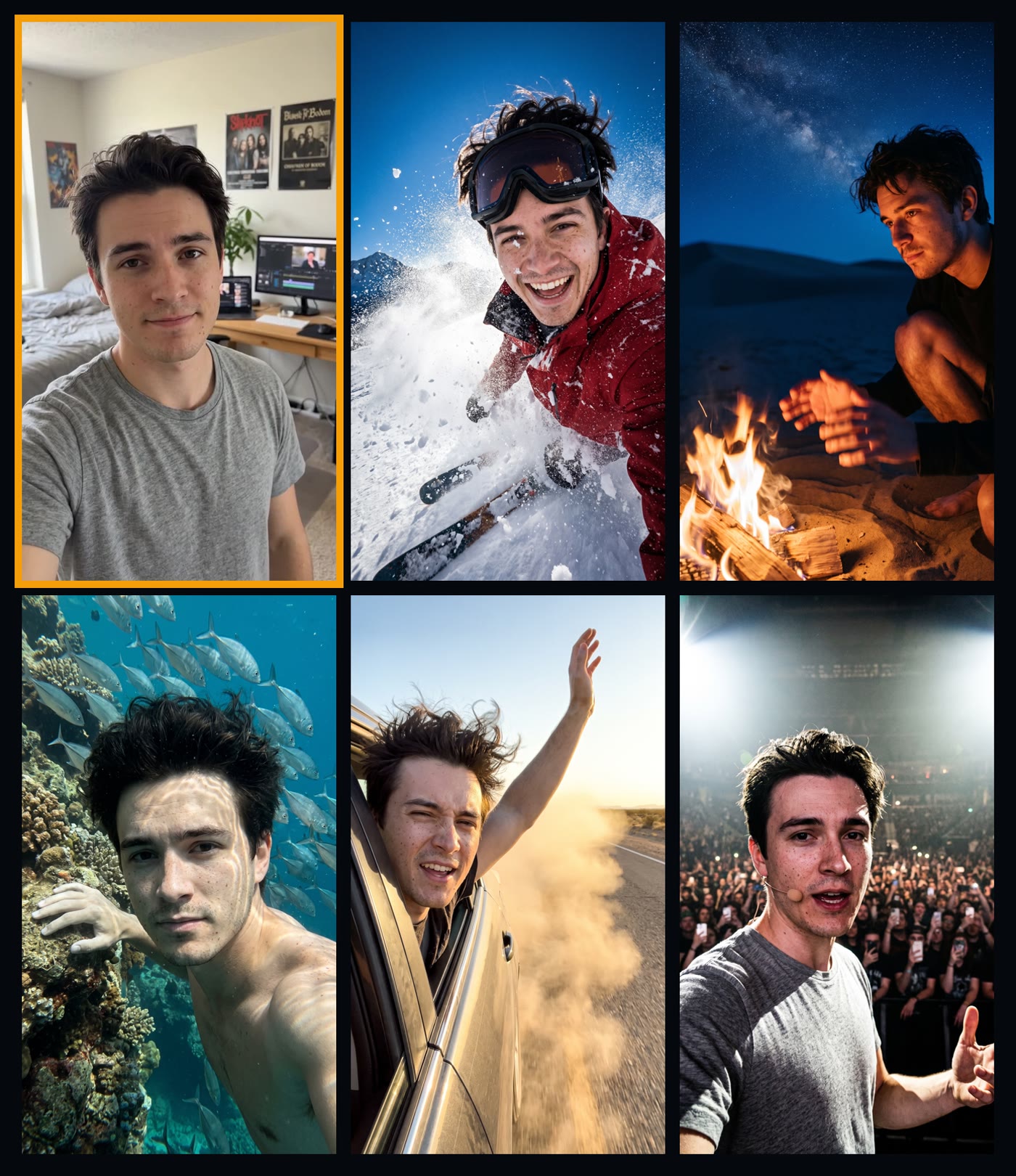
Snow, firelight, underwater, dust, stage spotlights. Five lighting setups that would break most character references, and it is the same man in all of them. That is the bar long-form needs, because the viewer sees all five inside one video.
Review stops being optional. On a short clip you can regenerate the whole thing if one shot is wrong. On a full episode you want to see what was chosen before anything renders, kill the moments that miss, and adjust the ones that are close. Generating first and reviewing after is fine at clip scale and expensive at episode scale.
How to actually do it
The workflow in Compledio is the same one you would use for a clip, with the settings pointed at length instead of density.
1. Upload the episode, not an export of the best bit. Video or audio only. If your podcast is audio, the whole video exists to be created, and B-roll is not decoration at that point, it is the entire picture.
2. Set coverage, not clip count. Coverage is the percentage of the runtime that gets generated visuals, the setting shown in the comparison above. There is no correct number. Interview shows with two engaged people on camera need less. Solo shows, audio-only shows, and anything with a lot of storytelling need more. Start somewhere in the middle, watch five minutes, and adjust.
3. Lock who appears in the shots. Compledio pulls frames straight out of your upload, so pick one of yourself and attach it as a character reference. That is the single amber-bordered frame in the grid above, and it is all the five scenes needed. Over forty clips this is the difference between a produced show and an obviously automated one. We covered the mechanics in the reference image guide and tested it side by side in the podcast style lock post.
4. Lock the look too. A character reference keeps the person consistent. A style reference keeps the palette, lighting, and grade consistent. Both matter more at length, because the viewer is with you long enough to notice a scene that does not belong.
5. Review before you render. Compledio pauses after it has found the moments and previewed them. This is the step to actually use on a long episode. Read the list, cut the moments where a visual would be redundant, rewrite the ones where the description missed the point of what you were saying. It is far cheaper to fix a moment than to regenerate a clip.
6. Then render, and let it run. A full episode is a lot of generation. It is not a two-minute job and it does not need you sitting there.
The mistake that makes long-form B-roll look bad
Covering everything.
The instinct with a new tool is to turn it up. Maximum coverage, a visual on every sentence. It looks impressive for ninety seconds and exhausting for fifty minutes. Long-form has a rhythm that short-form does not: the viewer needs to land back on a face regularly, because that is where the conversation is. B-roll that never lets up stops reading as production value and starts reading as a screensaver.
The episodes that work have B-roll where the words earn it. Someone describes a place, you see the place. Someone tells a story, you see the story. Someone makes an argument, you stay on their face, because their face is the point.
That is also the reason automatic selection has to read the transcript rather than run on a timer. A clip dropped every forty-five seconds will land in the middle of an argument as often as it lands on a story.
When clips are still the right answer
None of this makes clipping the wrong tool. If your distribution is Shorts, Reels, and TikTok, the clip is the product, and the full episode is the raw material. Cover the clips and leave the episode alone.
The point is that it should be your decision rather than your tool's. Plenty of shows want both: the full episode on YouTube with B-roll through it, and eight clips pulled from the same upload for everywhere else.
The short version
- AI B-roll being a clips-only feature is a limitation of most tools, not a rule.
- At episode length, coverage percentage replaces clip count as the control that matters.
- Character and style references matter far more across forty clips than across three.
- Review the chosen moments before rendering. On a long episode this is the step that saves the most time.
- Do not cover everything. Long-form needs to land back on a face.
If your show is audio only and this sounds like it does not apply, it applies most. We wrote about that case separately in making a video from just audio.
Want to see what your own episode looks like with B-roll through it rather than just on the clips, upload one to Compledio and set coverage where you think it belongs.